Build
Programs, standalones, supersets, drop sets.
Programs & standalone workouts
Programs hold multiple training days under one name and can be set as active on Home. Standalones are one-offs with no schedule pressure. Rename, duplicate, archive, run again as-is.
Day builder
Name and icon per day. Exercises in the order you'll do them, with sets, reps, rest, warmup flags, notes and an engine each. Move days, copy to another program.
Guided workout builder
A 15-question interview: single workout or program, what you're hitting, goal, how heavy, sets, time, where, equipment, cardio, experience, energy, exclusions, pacing, rest, caffeine. Review, swap, save.
Superset wizard
ADD → SUPERSETS → NEW. Name it, pick muscle groups and equipment, choose exercises machine by machine, set reps and engine, FINALIZE. Saved templates are reusable; add several to a day in one go.
Drop sets
One exercise, falling weight, minimal rest — formula, stage count, starting weight and reps, inter-stage rest. Build a template, or convert a regular set to a drop set mid-workout from the row's menu.
Custom exercises
Not in the 483-entry catalog? Build your own with muscle group and equipment so history, PRs and charts stay lined up.
Four shipped programs
BEGINNER (linear gains, build the habit), INTERMEDIATE (5/3/1 main lift, Power Matrix on the heavy compound, Progressive Overload on accessories), ATHLETE and EXPERT (conjugate-style, multiple Power Matrix compounds). Day one has a plan.
Share programs with friends
Send a clean copy of any workout or program to another Plate Daddy user by link (Messages, Mail, AirDrop) or file. Tap it and it opens in an import preview. Your history stays private.
Onboarding tour
A friendly first-launch walkthrough that shows the app the way a friend would, in the order you'll actually use it. Skippable, replayable.
Lift
The active workout.
Picking a day, working through the exercises, logging sets, watching the rest clock. Everything here is built to run cleanly when you're sweaty and out of breath.
Targets on every row
The engine hands you the exact load and reps for each set. Glance, adjust if reality didn't match, tap LOG.
Rest timer + Live Activity
Starts when you log. Runs in the app, on the Lock Screen and in the Dynamic Island. Ding when it expires, buzz on silent with headphones. "Break is over — back to work."
Rounds for supersets
The round you're on is open; the rest wait as collapsed banners. LOG ROUND seals it; the next opens automatically. Round 1 prefills Round 2.
LAST TIME, editable
See last session's sets under the current exercise, and fix a mis-entered number right there. The engine recalculates.
Inline plate calculator
A tiny calculator icon beside the weight field opens already loaded with your target. Plates per side, real bar weights, sled base weight.
Repeat, notes, history, warmups
Repeat copies your last set in one tap. Notes for "used pin 4." History pill for your last few sessions. Warmup toggle so warmups don't pollute PRs or volume.
RPE and AMRAP
RPE per set with an override picker. AMRAP top sets on 5/3/1 get their own banner.
Music marquee
SOURCE and SONG pills in the header show what's playing in Apple Music or Spotify, with play / pause / skip inline. Tap SOURCE to swap mid-set.
PR moment
Hit a personal best and the app catches it the instant it happens — banner, fireworks, and a certificate ready to share.
Return to Workout
Wander off to the calendar or a notification and a banner drops you straight back onto the set you were on.
Exercise "i"
The info icon next to the exercise name opens its how-to guide — photos and coaching steps — in a sheet.
Statistics drawer
Under every exercise's set rows, a collapsible chart of your full history — weight, reps or volume — with the MAXED ceiling marked when a machine is capped.
Engines
Four flavors of "what comes next?"
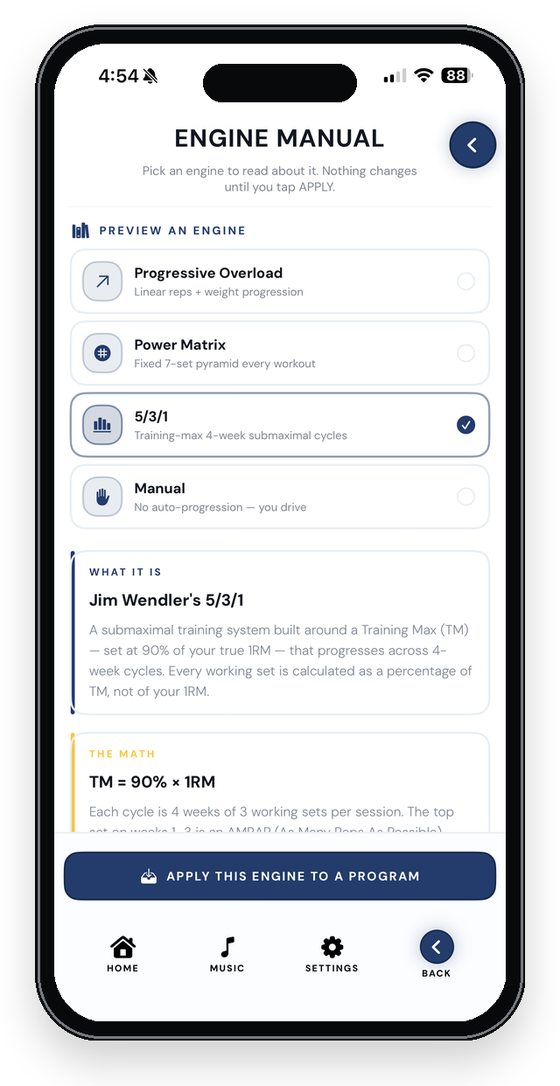
Progressive Overload, Power Matrix, 5/3/1 and Manual. Settings sets a default, a program can override it, a day can refine it, and an individual exercise can still use its own rule set. Then the engine adapts: machine caps move progress into reps and sets; missed reps trigger a recovery session that holds the weight while you rebuild.
Track
Calendar, statistics, records, trophies, body.
Workout calendar
A month at a glance. Green for days you trained, red for planned-and-missed, amber for what's coming, a trophy when you hit a PR. Open any green day and pull up the workout like a postcard.
Weekly scheduler
Drop workouts onto future dates, set reminders, and push planned days to Apple Calendar so training shows up next to everything else.
Statistics dashboard
Training volume by week, estimated 1RM per lift, push/pull/legs balance, muscle-group splits, monthly KPIs, sessions per week. Computed once, charted everywhere.
KPI dashboard on Home
Pick up to six numbers that matter to you and they get top billing. The layout rearranges itself around your choice.
Personal records
Heaviest weight, most reps, best estimated 1RM — by lift, grouped by muscle, with the date you did it.
Trophy Wall
68 trophies across Achievements, Strength and Milestones, each with a live progress bar. Earned trophies stay earned forever.
Levels & certificates
50 points per finished workout, streak bonuses, 25 per PR, a point per 1,000 lb of lifetime tonnage. Level up and get a certificate worth printing.
Streak
Daily, weekly or rolling, so rest days don't punish you. Ten visual styles: pulse ring, week bars, arc gauge, plate stack, bolt charge, week dots, milestone track, power orbs, sparkline, rank badge.
Body metrics
Weight, body fat, neck, shoulders, chest, biceps, forearm, waist, hips, thigh, calf. Progress photos, side-by-side compares, a month calendar. Photos never leave the app.
Workout log manager
The raw log, editable. When a chart looks weird, this is where you find out what actually happened. Bulk delete without waiting.
Lifter ID
Your profile, your level, your certificate. Set your gender once and the right Daddy or Mommy options appear everywhere.
Apple Health
Finished workouts write to the Health app as strength training. Body weight, body fat and macros mirror too, when you turn the sync on.
Fuel
Meal planning.
Nutrition in the same app, in plain English. Pro.
Daily macros & water
A month calendar first; tap a date and log protein, carbs, fat and water for that day. One entry per day, editable.
Barcode scanner
Point the camera at a UPC or EAN (or type the numbers) and branded foods come back from USDA FoodData Central — a million-plus items — cached on your phone after the first lookup.
Quick Meals
Pick a protein you have, toggle snack or meal, generate a recipe. Regenerate for the next option. Log the whole thing into the day. Keto filter included.
Goals & Build My Day
A short questionnaire sets your targets. Build My Day fills the slots; the gap engine tells you what's still missing.
Meal reminders
Goal-aware and cascading: every time you log a meal, the rest of today's reminders reschedule with fresh numbers.
Offline generic foods
Chicken, eggs, rice and the rest of the seed database plus 20 recipes work fully offline. Only branded barcode lookups need a connection the first time.
Own it
Make it yours.
30 themes
Light and dark in blue, green, orange, pink, purple, red, teal and yellow. Named worlds: Golden Eye, Olive Drab, Day Walker, Silverfish, The Patriot. Premium: Silverback, Mama Bear, Crowned Heart, Detroit Leather, Detroit Lace, Warm Well Whiskey.
Theme Designer
Build your own theme from your own colors. Custom themes sync through iCloud like everything else.
Two app icons
Plate Daddy blue or Plate Mommy pink on your home screen. Premium themes bring their own icon, from the chrome gorilla to the rose-gold bear.
Banner wallpapers
170+ backdrops for your Active Program banner, in themed folders, with a global / per-program switch and a white / black text picker.
Service & trade badges
Loading badges for police, fire, EMS, nurses and every military branch, plus the trades: mechanic, construction, factory, farmer, truck driver, chef, teacher, student, office, lawyer. Gender-matched, with five color alternates.
Team themes
Hidden school-team skins unlock with a code from the team. Scan the QR, and the theme, wallpapers and icon appear.
Custom bottom navigation
Rearrange the tabs so the tools you use are where your thumb lands.
Default engine & KPIs
Set what new workouts inherit, which numbers lead on Home, and how you think about streaks.
Sounds
A bell when rest is up, a buzz on silent, and no auto-popups or sticky banners. Music stays manual on purpose.
Learn
329 guides. Pictures, not paragraphs.
A beginner-focused exercise library: browsable, picture-based how-to guides with start and finish form photos, target muscles, difficulty, mechanic, equipment, and numbered coaching steps. Free.
- Browse the whole library from the Learn tab.
- Open a guide from the active workout with the "i" next to the exercise.
- Guides are bundled in the app, so they work offline.
- Hinge to a 45° torso, bar over mid-foot.
- Pull to the lower ribs, elbows tight.
- Pause, lower under control.
Your data
Yours to keep. Yours to move.
Offline-first, no account
Every feature works with zero network. Nothing waits on a request. There's no sign-up because there's no server.
iCloud sync
Turn it on and your logs, programs, schedule, theme, KPI picks, streak and body metrics follow you to your next iPhone.
Cloud snapshots
Every upload also saves a timestamped snapshot. Browse them like a time machine and restore a known-good state after a bad edit or an accidental delete.
Full backup
One bundle with programs, logs, schedule, preferences, body metrics and progress photos. Export it, import it on a replacement phone, done.
Import from other apps
Strong, Hevy and Jefit CSV exports. Best-effort parsing that never rejects a file, format auto-detected from the header, every exercise matched against the catalog with a live status bar. Remove an import batch later in one tap.
Universal CSV export
Date, workout, exercise, set order, weight, reps, RPE, duration, distance, notes, program. Your numbers in a file you can open anywhere.